Home / Blog / Image Translation / Video Translation / Support / Donation / RSS
Use ChatGPT to Help Translate Images
ChatGPT is a large language model-driven chat program that we can use to complete tasks such as language translation and proofreading.
ImageTrans provides a plugin for ChatGPT that allows us to call ChatGPT to help translate images.
Requirements
Register an OpenAI account and generate an API key. You can also use other large language models (Gemini, DeepSeek, etc) as long as they provide an OpenAI-compatible API.
Instructions
-
Fill in the API key in the preferences of ImageTrans.
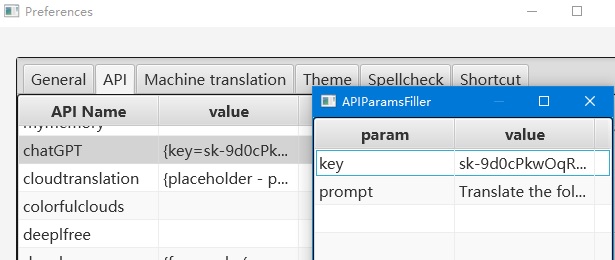
-
Call ChatGPT to translate.
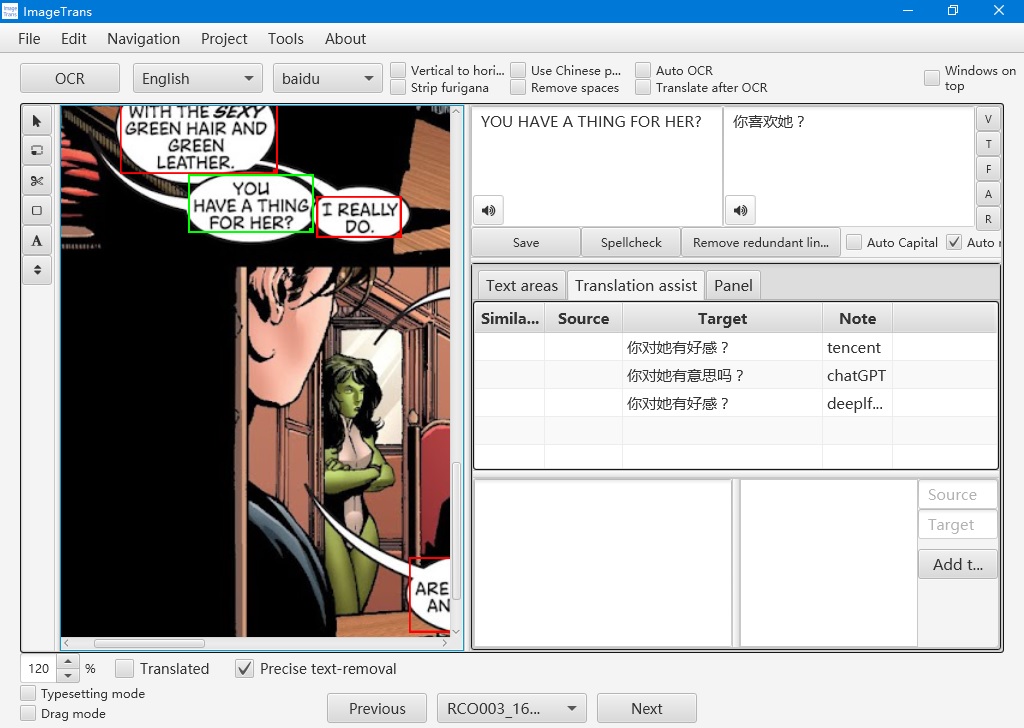
It can be used as a reference during translation or for batch translation.
You can also customize the model to use and the host.
Customize the Prompt
By default, the following English prompt is used to get the translation:
Translate the following into {langcode}: {source}
{langcode} is replaced with the target language’s name, such as Chinese, and{source} is replaced with the text to be translated.
You can define your own prompt in your preferences, such as the following Chinese version:
翻译下述内容至中文:{source}
Here is the list of prompts you can customize:
prompt: single sentence translation promptbatch_prompt: multiple-sentence translation promptvision_batch_prompt:multiple-sentence translation prompt with visionprompt_with_term: single sentence translation prompt (with terms)batch_prompt_with_term:multiple-sentence translation prompt (with terms)vision_batch_prompt_with_term:multiple-sentence translation prompt with vision (with terms)spell_checking_prompt: spellcheckingtransliteration_prompt: transliteration
Batch Translation
The ChatGPT plugin will send all the sentences in one image to ChatGPT by defalut. You can customize the prompt in the Preferences as well.
You can disable this behavior in Preferences.
In addition, you can export the source text, use a third-party tool to do the translation and then import the translation back.
Cross-Page Translation
- Enable Cross-Page Translation in preferences. Then when using Batch - Pre-translate, it will join the text of multiple pages for translation to provide more context.
- Enable Use Text of Previous Pages in preferences. Then when translating a single image, it will use the text of previous pages to provide more context.
Vision Model
Enable Use Image to Assist Translation in preferences to send the image to a vision model to improve the translation quality.
Use Terms to Improve the Translation
You can define terms in the project. If the sentences to translate contain term entries, ImageTrans will send the terms to ChatGPT to improve the translation. For example, we can define the translation of Jenny to “詹妮” instead of “珍妮”. Check out this issue for details.
Control Thinking
In prefrences, use extra_fields to set extra options. For example, we can control the thinking mode and reasoning effort.
For ChatGPT:
{
   "reasoning_effort": "high"
}
For DeepSeek (with separate thinking control):
{
   "thinking": {"type": "disabled"},
   "reasoning_effort": "high"
}
OCR
ChatGPT can also be used to recognize text (use ChatGPTOCR plugin).
If using general OCR software to get the text, we can use ChatGPT to spell check the result.
Although vision LLMs can locate text, the coordinates are not very accurate. We can detect the text first, mark the areas in the image and the pass the image for the model for recognition. In ImageTrans, use “Append text to existing areas with OCR” to do this. It can also detect text color, detect stroke color, correct reading order and translate at the same time.
Text Cleaning
With image-to-image model, we can get the translated picture in an end-to-end way. But the current result is not satisfying and is not easy to be integrated into a traditional workflow. It is more suitable for text cleaning (use OpenAI Inpaint plugin). Gemini has a better result than ChatGPT in this aspect.
Limitation
The limitation of the plugin is that it does not allow for continuous conversations like the web version to improve the translation.
Other Machine Translation Engines
In addition to ChatGPT, ImageTrans also supports other machine translation engines. Note, however, that most of the engines need you to provide an API key.
- Baidu (key built-in)
- Tencent (key built-in)
- Colurful Clouds (trial key built-in)
- DeepL (free version available)
- Cloud Translation (free)
- Niutrans
- Youdao
- Volcano
- MyMemory (free)
- Microsoft
- Yandex
- Papago
- Opus-CAT (offline, free)
- Sugoi Translator (offline, free)
Use other LLMs
As long as the large language model provides an OpenAI compatible API, we can use it.
Some LLMs:
© 2026 BasicCAT ― Powered by Jekyll and Textlog theme